Fixing Traefik and proxy issues
Lando is one of the best development tools for PHP developers, but sometimes the Traefik reverse proxy breaks and the project URL stops behaving as expected.
Start with the basic recovery steps:
lando poweroff
lando start
lando rebuild -y
If that still does not fix the problem, go deeper:
lando poweroff
docker rm 64451b59f5ef # the Traefik container ID to be removed
docker network prune # removes created Docker networks

# use with caution: this can affect networks used by other projects
# if you run this command, it is often best to remove the ~/.lando directory too

docker destroy -y # removes all containers related to the project

# create a database backup first or you will lose local data

rm -Rf ~/.lando # removes plugins and configuration from the Lando config directory

# sometimes this alone fixes the issue; run lando poweroff first

docker system prune -a # last resort: removes containers, images, and networks system-wide

# on macOS with Apple Silicon, this may be the only option that fixes some cases
Setting up Xdebug with Lando
Xdebug is still essential for PHP development, so here is the setup I use with Lando.
First, adjust .lando.yml:
name: drupal-module-development-book
recipe: drupal10
config:
  webroot: web
  php: 8.1
  database: mariadb
  xdebug: true
  config:
    php: scripts/php.ini

services:
  appserver:
    overrides:
      extra_hosts:
        - "host.docker.internal:host-gateway"
Then create scripts/php.ini:
[PHP]
memory_limit = -1

[XDEBUG]
xdebug.mode=develop,debug,coverage
xdebug.start_with_request=on
xdebug.client_port=9003
xdebug.log_level=0
xdebug.idekey=PHPSTORM
xdebug.client_host=host.docker.internal
xdebug.log=/dev/stdout
This sets the container gateway so Docker can reach the host machine and configures Xdebug 3 to listen on port 9003 with the PHPSTORM IDE key.
The next step is enabling requests from the browser. Install the Firefox extension Xdebug helper. If you use Chrome, look for an equivalent extension there.
After that, configure your IDE or editor to listen for the debugger. In PhpStorm, go to Run -> Edit Configurations....
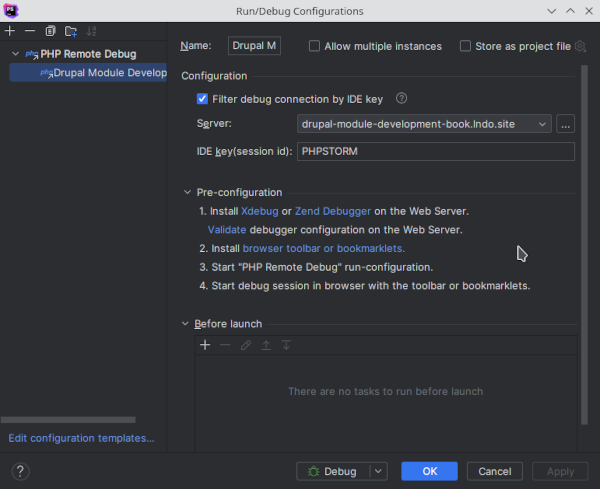
And that is it. Happy hacking.